Building & Apartment Management
One system for everyone who lives in the building — and everyone who runs it.
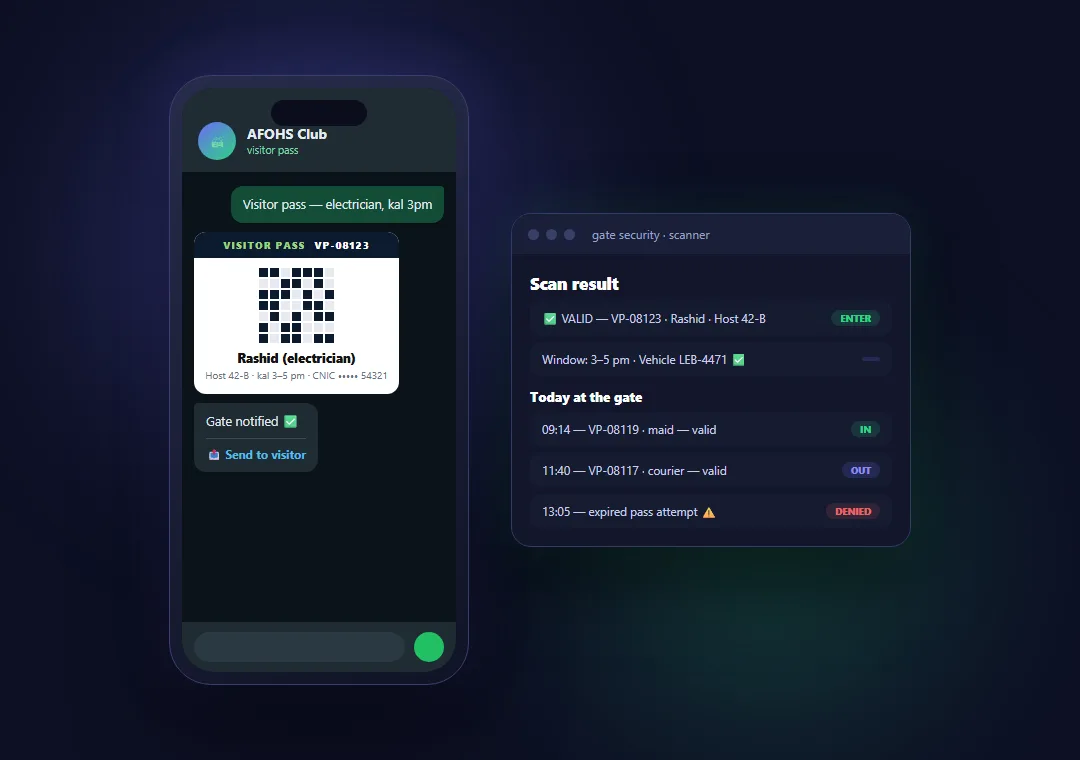
A developer builds the building. Something else has to run it once people move in. That part is usually a gate register, a WhatsApp group and a management office — in a building the owner still calls by the builder’s name.
A tower is not a housing colony. The problems are lifts, bays and a reception desk, and this is built around them.
What a household stops telephoning the office about
Visitor passes
Name, CNIC, date, time slot, vehicle and how many people — producing a QR code the desk scans at the barrier.
Gate passes
What is leaving the building and who is carrying it. A four-digit PIN, single use, dead at the end of the day.
Complaints & maintenance
Noise, parking, cleaning, a lift or an AC — with a photo or a voice note. Each one produces a case number or a ticket with a priority.
Emergency alert
Fire, medical, security or gas. The apartment and the name travel with it to the desk, without anyone having to explain where they are.
Registration & approval
Tower, floor and apartment — owner, family or tenant. Only a real address gets in, and the office decides who.
Directory, notices & their own record
Management, security and committee numbers, tap to call. Every pass, case and ticket the household ever raised, kept in one place.
On the roadmap: bookings and appointments, parking bays, and service charges with receipts and reminders. Bookings is not a new product — it is one we already ship, pointed at a building’s amenities.
Bookings, when a building needs them
“Booking” turns out to be four different problems, and they all check the same calendar so nothing is issued twice: amenities (community centre, gym, rooftop, pool) with the slot, the charge and the deposit; parking, where bays are numbered so a booking is a bay rather than a hope; building logistics — the cargo lift, a contractor window, a tanker refill — the resources that stop a tower when two apartments want them the same morning; and appointments with a person, a named fifteen minutes instead of a queue outside the office door.
The people who run the building get a screen too
Reception, the gate and the management office work in the same system the residents do — so a visitor expected on somebody’s phone is already on the desk’s screen when they walk in, and the guard gets a yes or a no rather than a phone call.
The office opens one page and sees what is waiting: registrations to approve, passes in force, complaints and tickets still open, and any emergency raised. Each count is a queue you click into. Access is split by job — a guard needs a verdict at the barrier, not a resident’s CNIC.
Built, loaded and ready to run
This is built and loaded for a gated residential community.
Every street and house is loaded from the community’s own records. It runs today on its own WhatsApp number, with an installed app for gate and office staff. Nine resident services work end to end, and there is nothing for a resident to install — no app, no account, no password to forget.
The office side runs on twelve screens covering residents, passes, complaints, maintenance, emergencies, gate scanning and the log itself — and a second building is configuration rather than a rebuild: its own address book, its own amenities, its own staff.
Client name withheld — we never publish a client’s name without their consent, and that includes yours.
The record cannot be quietly edited
Every approval, rejection and gate scan is written to an append-only audit log. The database itself refuses to update, delete or truncate those rows — the refusal is enforced by the database, not by the application asking nicely. We tested it against a superuser account: all three refused.
Alongside it: admin lockout after five failed logins in fifteen minutes, with every attempt recorded against its IP; and gate passes consumed inside the same database write that checks them, so the same code cannot be approved twice, even on two scanners at once.
For a committee answering to residents — or a head office answering to an owner — that log is usually the point.
For builders and developers
After possession the brand normally goes quiet. This keeps your name on a screen a family opens every week, for the next project and the one after.
A buyer choosing between two similar towers is choosing between two promises — and one of them can be demonstrated on a phone in the sales office. Head office sees which towers generate complaints, which amenities are actually used and where the bays run short, across every project, without asking anyone for a report.
The build happens once. Every project after it is the same platform pointed at a different building — its own units, its own amenities, its own staff — so each one costs less than the last and none of them starts from nothing.
Where it runs
We host it, or you do. On our infrastructure there is nothing for you to buy, provision or manage, and it starts immediately. On yours, the data never leaves your estate — which is what policy sometimes requires. The system is the same either way.
Related solutions
Industries that use this
Tell us about your building — takes about a minute. We reply within 1–2 business days.
Book a free scoping session →